
What is HDMI? High-Definition Multimedia Interface
December ,15 ,2025
High-Definition Multimedia Interface, better known as HDMI, is the most widely used digital audio and video connection standard in the world today. From TVs and monitors to laptops, game consoles, cameras, and AV receivers, HDMI has become the universal link that carries both high-quality video and audio over a single cable.
Introduced in the early 2000s, HDMI was designed to simplify connections while supporting increasingly demanding video formats. It replaced older standards such as VGA, DVI, and component video in consumer electronics, and it continues to evolve alongside modern display technologies like 4K, 8K, HDR, and high-refresh-rate gaming.
In this guide, we will clearly explain what HDMI is, how it works, its versions and capabilities, connector types, advantages and limitations, and how it compares to other display interfaces. Whether you are an engineer, an IT professional, or simply someone trying to understand the ports on your devices, this article aims to explain HDMI in a practical and straightforward way.
HDMI is a digital interface standard used to transmit uncompressed video and compressed or uncompressed audio between a source device and a display or audio system. Unlike DVI, which was designed mainly for computers, HDMI was built from the start for both PCs and consumer electronics.
Key characteristics of HDMI include:
• Single-cable solution
HDMI carries video, audio, synchronization signals, and control data through one cable, reducing wiring complexity.
• All-digital transmission
Signals remain digital from source to display, ensuring consistent image quality with no analog conversion loss.
• Broad device compatibility
HDMI is used across TVs, monitors, laptops, graphics cards, cameras, projectors, streaming devices, and game consoles.
• Backward compatibility
Newer HDMI versions generally work with older HDMI devices, though limited by the lowest supported feature set.
HDMI defines several connector sizes to suit different devices:
• Type A (Standard HDMI)
The most common connector, found on TVs, monitors, PCs, and game consoles.
• Type C (Mini HDMI)
Smaller than Type A, commonly used on older cameras and compact devices.
• Type D (Micro HDMI)
Even smaller, used on action cameras, tablets, and ultra-compact electronics.
• Type E (Automotive HDMI)
Designed for in-vehicle use with improved locking and vibration resistance.
Despite different physical sizes, all HDMI connectors support the same signal structure when paired with compatible versions.

HDMI transmits data using Transition-Minimized Differential Signaling (TMDS) in most versions (HDMI 2.1 introduces FRL, or Fixed Rate Link, for higher bandwidth). In simple terms, HDMI sends pixel data, audio samples, and timing information in tightly synchronized digital streams.
A simplified workflow looks like this:
1. The source device (PC, console, player) generates digital video and audio data.
2. HDMI encodes this data into high-speed digital signals.
3. The HDMI cable transmits the signals with shielding to reduce interference.
4. The display or AV receiver decodes the signals and renders the image and sound.
Because the signal stays digital end-to-end, HDMI avoids the noise, blur, and alignment issues common in older analog standards.
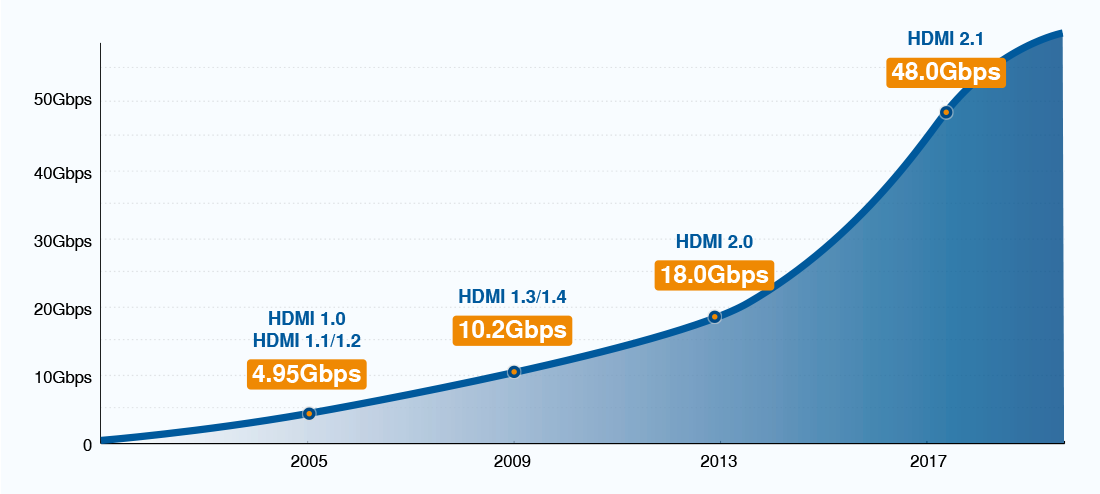
HDMI capabilities are fundamentally limited by bandwidth. Resolution, refresh rate, color depth, and HDR all consume bandwidth, which is why HDMI version numbers matter in real-world use.
HDMI Version Bandwidth and Capability
• HDMI 1.0 / 1.1 / 1.2
o Maximum bandwidth: 4.95 Gbps
o TMDS clock: 165 MHz
o Typical support: 1920×1080 @ 60 Hz, 8-bit color, RGB or YCbCr 4:4:4
o Bandwidth roughly matches single-link DVI and targets early HDTVs and PC monitors.
• HDMI 1.3 / 1.4
o Maximum bandwidth: 10.2 Gbps
o TMDS clock: 340 MHz
o Typical support: 2560×1440 @ 60 Hz, 3840×2160 @ 30 Hz, Deep Color (10-bit / 12-bit)
o HDMI 1.4 introduced 4K support, but bandwidth is insufficient for 4K60.
• HDMI 2.0 / 2.0a / 2.0b
o Maximum bandwidth: 18 Gbps
o TMDS clock: 600 MHz
o Typical support: 3840×2160 @ 60 Hz, 8-bit RGB or YCbCr 4:4:4, 10-bit HDR using YCbCr 4:2:2
o This version made 4K60 practical for mainstream TVs and monitors.
• HDMI 2.1
o Maximum bandwidth: 48 Gbps
o Signaling: FRL (replaces TMDS)
o Typical support: 3840×2160 @ 120 Hz, 7680×4320 (8K) @ 60 Hz, 10-bit / 12-bit color with HDR, VRR, ALLM, QMS, eARC
o HDMI 2.1 is designed for next-generation displays and high-frame-rate gaming.
HDMI standards and future updates are managed by HDMI Forum.
Two HDMI connections labeled “4K” can behave very differently:
• 4K @ 60 Hz
o HDMI 1.4: Not supported
o HDMI 2.0: Supported with limitations
o HDMI 2.1: Fully supported
• 4K @ 120 Hz
o HDMI 2.0: Not supported
o HDMI 2.1: Supported
• HDR and higher color depth
Increase bandwidth demand even at the same resolution.
This is also why cable quality matters. A device may support HDMI 2.1, but an older cable can limit performance.
HDMI cable labels directly correspond to bandwidth capability:
• Standard HDMI Cable – up to 4.95 Gbps
• High Speed HDMI Cable – up to 10.2 Gbps
• Premium High Speed HDMI Cable – up to 18 Gbps
• Ultra High Speed HDMI Cable – up to 48 Gbps (required for HDMI 2.1 features)
Choosing the correct cable is essential for stable high-resolution transmission.
Advantages
• One cable for audio and video
Simplifies setup and reduces clutter.
• Wide industry adoption
Almost universal across consumer electronics.
• High resolution and refresh rate support
Suitable for modern TVs, monitors, and gaming systems.
• Strong content protection
Built-in HDCP support for commercial media playback.
Disadvantages
• Cable length limitations
Standard passive HDMI cables are typically reliable up to 5–10 meters at high resolutions.
• Version confusion
HDMI version numbers and cable labels can be confusing for users.
• Licensing requirements
HDMI involves licensing fees, which can increase product costs.
Today, HDMI is used in nearly every display scenario:
• Home entertainment
TVs, soundbars, AV receivers, and streaming devices.
• Gaming
Consoles and gaming PCs rely on HDMI 2.1 for high frame rates and low latency.
• Professional AV
Conference rooms, digital signage, and video production setups.
• Industrial and commercial systems
HDMI remains common due to its reliability and long-term availability.
For long-distance transmission, HDMI signals are often extended using fiber-optic HDMI extenders, enabling stable transmission over hundreds of meters or more.
Does HDMI support audio?
Yes. HDMI was designed to carry both video and audio. It supports stereo, multi-channel surround sound, and advanced audio formats.
Can HDMI be converted to DVI or DisplayPort?
Yes.
• HDMI to DVI conversion is simple for video only (no audio).
• HDMI to DisplayPort usually requires an active adapter.
Compatibility depends on resolution and refresh rate.
What is the maximum HDMI cable length?
For passive copper cables:
• Up to ~5 m for 4K60 reliably
• Shorter lengths for higher resolutions
For longer distances, active or HDMI over fiber solutions are recommended. the HDMI to Fiber Converter support single-mode up to 10km
HDMI has become the backbone of modern digital video and audio connectivity. Its ability to deliver high-quality video, immersive audio, and advanced control features over a single cable transformed how devices connect and communicate.
While newer standards like DisplayPort dominate certain professional and PC-focused applications, HDMI remains unmatched in consumer electronics and home entertainment. By understanding HDMI’s fundamentals, versions, and real-world capabilities, you can make better decisions when designing systems, choosing cables, or integrating new and legacy equipment.
Even as display technology continues to advance, HDMI’s role as a reliable, flexible, and widely supported interface ensures it will remain a key part of the digital ecosystem for years to come.
Reference:
https://en.wikipedia.org/wiki/HDMI
Introduced in the early 2000s, HDMI was designed to simplify connections while supporting increasingly demanding video formats. It replaced older standards such as VGA, DVI, and component video in consumer electronics, and it continues to evolve alongside modern display technologies like 4K, 8K, HDR, and high-refresh-rate gaming.
In this guide, we will clearly explain what HDMI is, how it works, its versions and capabilities, connector types, advantages and limitations, and how it compares to other display interfaces. Whether you are an engineer, an IT professional, or simply someone trying to understand the ports on your devices, this article aims to explain HDMI in a practical and straightforward way.
The Basics of High-Definition Multimedia Interface (HDMI)
HDMI is a digital interface standard used to transmit uncompressed video and compressed or uncompressed audio between a source device and a display or audio system. Unlike DVI, which was designed mainly for computers, HDMI was built from the start for both PCs and consumer electronics.
Key characteristics of HDMI include:
• Single-cable solution
HDMI carries video, audio, synchronization signals, and control data through one cable, reducing wiring complexity.
• All-digital transmission
Signals remain digital from source to display, ensuring consistent image quality with no analog conversion loss.
• Broad device compatibility
HDMI is used across TVs, monitors, laptops, graphics cards, cameras, projectors, streaming devices, and game consoles.
• Backward compatibility
Newer HDMI versions generally work with older HDMI devices, though limited by the lowest supported feature set.
HDMI Connector Types
HDMI defines several connector sizes to suit different devices:
• Type A (Standard HDMI)
The most common connector, found on TVs, monitors, PCs, and game consoles.
• Type C (Mini HDMI)
Smaller than Type A, commonly used on older cameras and compact devices.
• Type D (Micro HDMI)
Even smaller, used on action cameras, tablets, and ultra-compact electronics.
• Type E (Automotive HDMI)
Designed for in-vehicle use with improved locking and vibration resistance.
Despite different physical sizes, all HDMI connectors support the same signal structure when paired with compatible versions.
How HDMI Works
HDMI transmits data using Transition-Minimized Differential Signaling (TMDS) in most versions (HDMI 2.1 introduces FRL, or Fixed Rate Link, for higher bandwidth). In simple terms, HDMI sends pixel data, audio samples, and timing information in tightly synchronized digital streams.
A simplified workflow looks like this:
1. The source device (PC, console, player) generates digital video and audio data.
2. HDMI encodes this data into high-speed digital signals.
3. The HDMI cable transmits the signals with shielding to reduce interference.
4. The display or AV receiver decodes the signals and renders the image and sound.
Because the signal stays digital end-to-end, HDMI avoids the noise, blur, and alignment issues common in older analog standards.
HDMI Versions and Bandwidth Explained
HDMI capabilities are fundamentally limited by bandwidth. Resolution, refresh rate, color depth, and HDR all consume bandwidth, which is why HDMI version numbers matter in real-world use.
HDMI Version Bandwidth and Capability
• HDMI 1.0 / 1.1 / 1.2
o Maximum bandwidth: 4.95 Gbps
o TMDS clock: 165 MHz
o Typical support: 1920×1080 @ 60 Hz, 8-bit color, RGB or YCbCr 4:4:4
o Bandwidth roughly matches single-link DVI and targets early HDTVs and PC monitors.
• HDMI 1.3 / 1.4
o Maximum bandwidth: 10.2 Gbps
o TMDS clock: 340 MHz
o Typical support: 2560×1440 @ 60 Hz, 3840×2160 @ 30 Hz, Deep Color (10-bit / 12-bit)
o HDMI 1.4 introduced 4K support, but bandwidth is insufficient for 4K60.
• HDMI 2.0 / 2.0a / 2.0b
o Maximum bandwidth: 18 Gbps
o TMDS clock: 600 MHz
o Typical support: 3840×2160 @ 60 Hz, 8-bit RGB or YCbCr 4:4:4, 10-bit HDR using YCbCr 4:2:2
o This version made 4K60 practical for mainstream TVs and monitors.
• HDMI 2.1
o Maximum bandwidth: 48 Gbps
o Signaling: FRL (replaces TMDS)
o Typical support: 3840×2160 @ 120 Hz, 7680×4320 (8K) @ 60 Hz, 10-bit / 12-bit color with HDR, VRR, ALLM, QMS, eARC
o HDMI 2.1 is designed for next-generation displays and high-frame-rate gaming.
HDMI standards and future updates are managed by HDMI Forum.
Why Bandwidth Matters in Practice
Two HDMI connections labeled “4K” can behave very differently:
• 4K @ 60 Hz
o HDMI 1.4: Not supported
o HDMI 2.0: Supported with limitations
o HDMI 2.1: Fully supported
• 4K @ 120 Hz
o HDMI 2.0: Not supported
o HDMI 2.1: Supported
• HDR and higher color depth
Increase bandwidth demand even at the same resolution.
This is also why cable quality matters. A device may support HDMI 2.1, but an older cable can limit performance.
HDMI Cable Categories and Bandwidth
HDMI cable labels directly correspond to bandwidth capability:
• Standard HDMI Cable – up to 4.95 Gbps
• High Speed HDMI Cable – up to 10.2 Gbps
• Premium High Speed HDMI Cable – up to 18 Gbps
• Ultra High Speed HDMI Cable – up to 48 Gbps (required for HDMI 2.1 features)
Choosing the correct cable is essential for stable high-resolution transmission.
Advantages and Disadvantages of HDMI
Advantages
• One cable for audio and video
Simplifies setup and reduces clutter.
• Wide industry adoption
Almost universal across consumer electronics.
• High resolution and refresh rate support
Suitable for modern TVs, monitors, and gaming systems.
• Strong content protection
Built-in HDCP support for commercial media playback.
Disadvantages
• Cable length limitations
Standard passive HDMI cables are typically reliable up to 5–10 meters at high resolutions.
• Version confusion
HDMI version numbers and cable labels can be confusing for users.
• Licensing requirements
HDMI involves licensing fees, which can increase product costs.
HDMI in Modern Applications
Today, HDMI is used in nearly every display scenario:
• Home entertainment
TVs, soundbars, AV receivers, and streaming devices.
• Gaming
Consoles and gaming PCs rely on HDMI 2.1 for high frame rates and low latency.
• Professional AV
Conference rooms, digital signage, and video production setups.
• Industrial and commercial systems
HDMI remains common due to its reliability and long-term availability.
For long-distance transmission, HDMI signals are often extended using fiber-optic HDMI extenders, enabling stable transmission over hundreds of meters or more.
Frequently Asked Questions About HDMI
Does HDMI support audio?
Yes. HDMI was designed to carry both video and audio. It supports stereo, multi-channel surround sound, and advanced audio formats.
Can HDMI be converted to DVI or DisplayPort?
Yes.
• HDMI to DVI conversion is simple for video only (no audio).
• HDMI to DisplayPort usually requires an active adapter.
Compatibility depends on resolution and refresh rate.
What is the maximum HDMI cable length?
For passive copper cables:
• Up to ~5 m for 4K60 reliably
• Shorter lengths for higher resolutions
For longer distances, active or HDMI over fiber solutions are recommended. the HDMI to Fiber Converter support single-mode up to 10km
Conclusion
HDMI has become the backbone of modern digital video and audio connectivity. Its ability to deliver high-quality video, immersive audio, and advanced control features over a single cable transformed how devices connect and communicate.
While newer standards like DisplayPort dominate certain professional and PC-focused applications, HDMI remains unmatched in consumer electronics and home entertainment. By understanding HDMI’s fundamentals, versions, and real-world capabilities, you can make better decisions when designing systems, choosing cables, or integrating new and legacy equipment.
Even as display technology continues to advance, HDMI’s role as a reliable, flexible, and widely supported interface ensures it will remain a key part of the digital ecosystem for years to come.
Reference:
https://en.wikipedia.org/wiki/HDMI